
Update or close an Overnight Parking request
Open an existing Overnight Parking request when its dates, vehicle, location, or contact information must change. Use the separate end-early or cancel actions when the request should no longer remain active.
Open the request
- Locate the request on the dashboard card or full Overnight Parking page.
- Select View to confirm that it is the correct request.
- Review the tracking number, plate, address, dates, requester, and current status.
Edit the request
- Select Edit on the request page or in the full request list.
- Update the applicable dates, reason, vehicles, location, contact information, approver, or notes.
- Recheck the map marker when the address changes.
- Select Save changes.
Select Cancel on the edit form to return to the request without saving the edits.
Create a related request with Use this
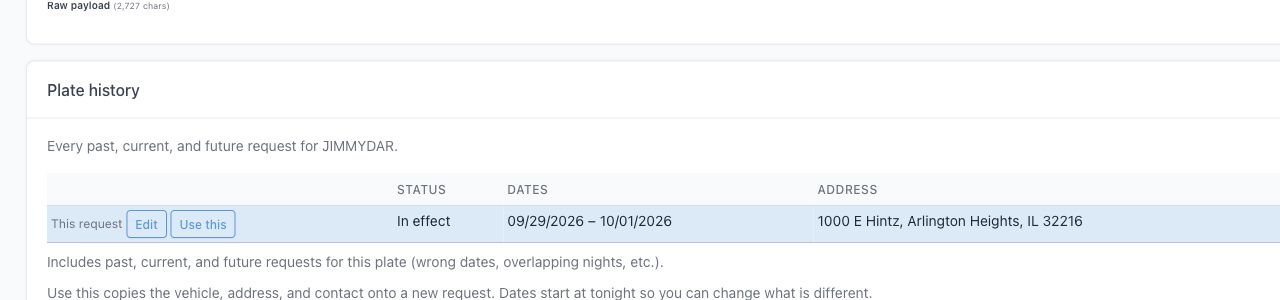
Plate history includes a Use this action. Use it when the same vehicle, address, and requester need a new parking period.
- Open the original request.
- Find the applicable row under Plate history.
- Select Use this.
- Change the dates and any other information that differs.
- Review the copied contact and vehicle information carefully.
- Save the new request.
The original request is not replaced. A separate request is created after the new form is saved.
End a request early
Use End request early when the request was valid but the remaining nights are no longer needed.
- Open the request.
- Enter an optional note explaining why it is ending.
- Select End request early.
- Confirm that the status changed to Ended early.
The original requested dates remain in the record, but the request drops from the current dashboard and active results.
Cancel a request
Use Cancel request when the request should be treated as cancelled rather than completed or ended early. Verify the plate, requester, and tracking number before cancelling.
Email an approval
When the request contains an email address, Email approval to requester sends the approval externally. Confirm the email address and request details before sending it.
Understand the difference
- Edit changes information on the existing request.
- Use this prepares a new request using copied information.
- End early preserves the requested dates but removes the request from active use.
- Cancel changes the request to a cancelled status.